Featured

Setting up a Main Account in D365 Finance

Let the Fun Begin!


In theory, adding a new account to the General Ledger is very easy. Easy enough for you to get yourself in trouble if you don’t know what you are doing! There are many things to consider, including number structure, default options, and financial reporting implications. If you have ever taken a look at a main account in D365 Finance, you may wonder why there were so many fields and fast tabs. 🤨 In the first article of this series, we briefly discussed how main accounts play into the chart of accounts. In this post, we will take a deeper dive into the main accounts, and give you the confidence you need when setting up a COA, or adding a new account. Specifically, we will look at how to set up a main account, and all the fields that can be configured to control the behavior.

Setting up a new Account:


If you are working on a new implementation and adding a full chart of accounts, or
just adding a new main account, your head might spin looking at the main account screen. There are six fast tabs and 30 fields for only one account! 🤯 No worries, we are going to walk through the common tabs and fields so you can utilize the system to its fullest potential.

General Fast Tab
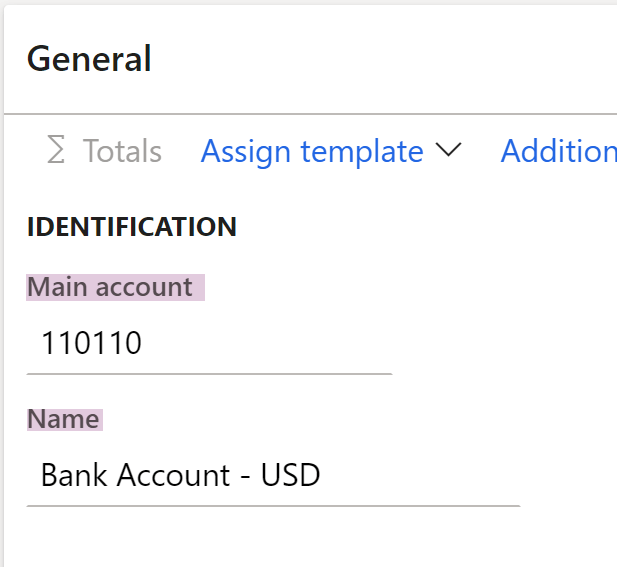
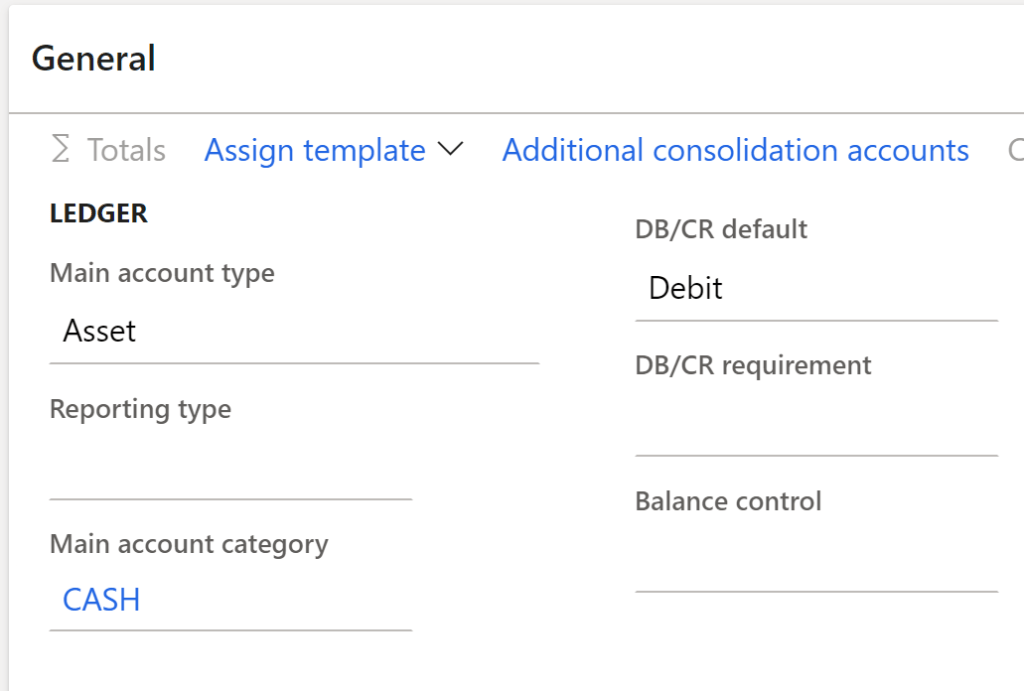
Identification section of General Fast tab on Main Account
FieldComments
Main AccountThe numbering structure needs to be scalable, business model, and future plans should also be taken into consideration. Here are a few tips to keep in mind when numbering your main accounts

– Typically you see account numbers range from 4 to 6 numbers
-Larger companies with a taller COA, will want to have more digits to account for growth.
-Including a totaling account in the number structure can be helpful for integrated financial reporting options.
-Some ISV’s work best with a header.  If there are future plans to add additional reporting options, this is something to keep in mind.
-Financial dimensions can be utilized to keep the number structure flatter than previous versions of a COA that may have needed a different account for each department, or region.
NameThis is the name associated with the account. It is recommended to keep naming conventions consistent and similar in size. Here are some examples:
– Start each letter with a capital
-Headers can be in CAPS
FieldComments
Main Account TypeThere are 10 different main account types, that determine how that account will behave in the system.  We will look at those more closely later in this article
Reporting TypeThis is used when the  Main Account Type is set to Reporting.
There are 3 different header options for how data is displayed on financial statements
-Header- Account information printed at the top
-Empty Header- Print an empty row at the top
-Page Header- Print at the top of each page
Main Account CategoryThere are 26 OOB options to choose from that are linked to default financial reports
DB/CR DefaultSet the column you want the cursor to appear in to match the natural balance of the account.
DB/CR RequirementIf you have an account that is only used for either debits or credit, you can use this parameter to identify which, and it will be validated and required to post accordingly.
This is great to help prevent users from booking entries wrong and can help a consultant make sure the system is set up to meet the clients’ requirements.
Balance ControlIf an account should have a total balance that is either a debit or credit, this parameter can set a validation point to ensure the sum of the transactions meets that requirement.
This helps let someone who is working with the closing and financials that something is not correct, and flags them to find and correct and mistakes. You can’t fix a problem if you don’t know it exists, so this is great to ensure quality control in financial reports!
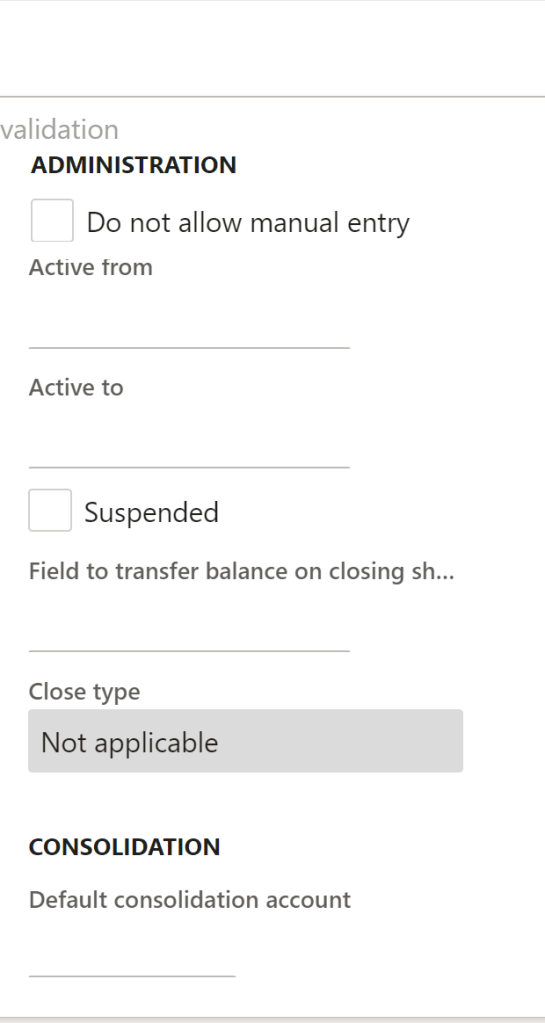
Administration Fields on Main Account


Field NameComments
Do not Allow Manual EntrySet this checkbox to yes for all accounts that are used in the posting profile.  This will ensure that the subledger and ledger stay in balance.
 
– When you are importing the GL history balances before a Go-Live you will need to switch these to allow manual entry, and then just change them back when you have posted your balance journals.
Active to & Active From Date RangeIf you use these date boxes, then only entries dated within that time frame will be validated and posted.
SuspendedIf you check this box, no transactions can be posted to the account. It will override the active date range setting
Transfer Balance on Closing SheetSet this checkbox to yes for all accounts that are used in the posting profile.  This will ensure that the subledger and ledger stay in balance.
 
– When you are importing the GL history balances before a Go-Live you will need to switch these to allow manual entry, and then just change them back when you have posted your balance journals.
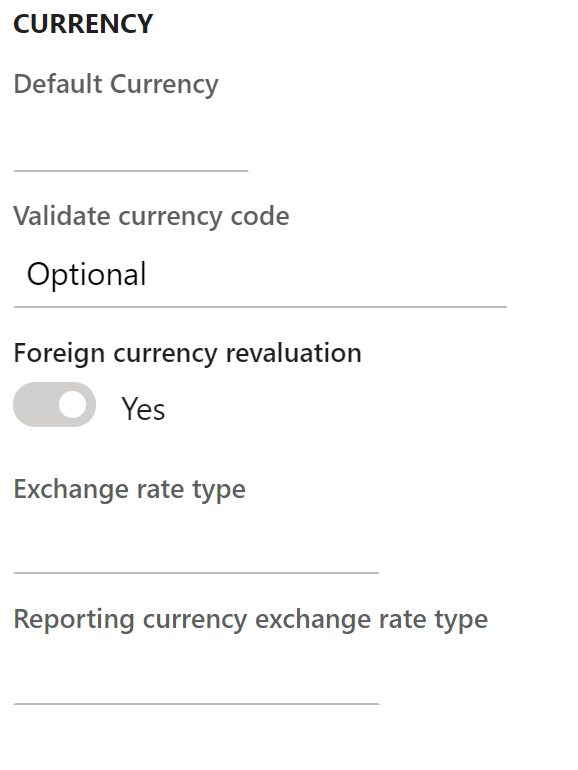
Currency Fields on the Main Account
FieldComments
Default CurrencySelect the currency that will default when that main account is used. You can override the default if needed
Validate Currency CodeSelect if the currency code is required or optional.
Foreign Currency Revaluation 
Identify if this account will be included when the GL Foreign currency revaluation is done during a periodic close.  You will still be able to incorporate the account if you set this to no, but it will take some manual effort. 
Exchange Rate TypeSelect the default exchange rate used during GL FX Revaluation 
Reporting Currency Exchange Rate Type 
Select if you want to use a different exchange rate for the reporting currency used for FX revaluations. 

Legal Entity Fast Tab

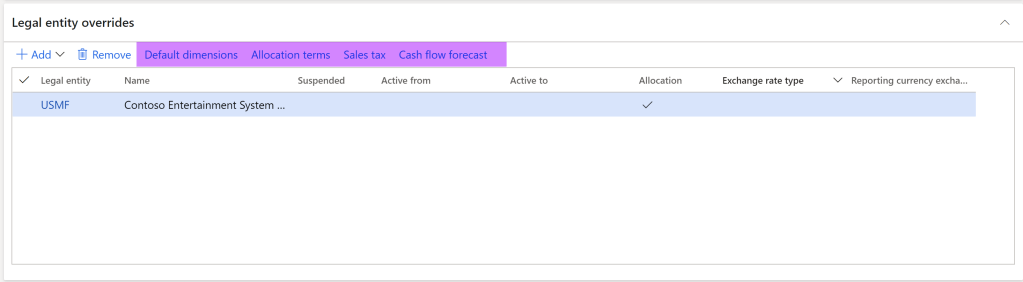
Legal Entity Fast Tab on Main Account

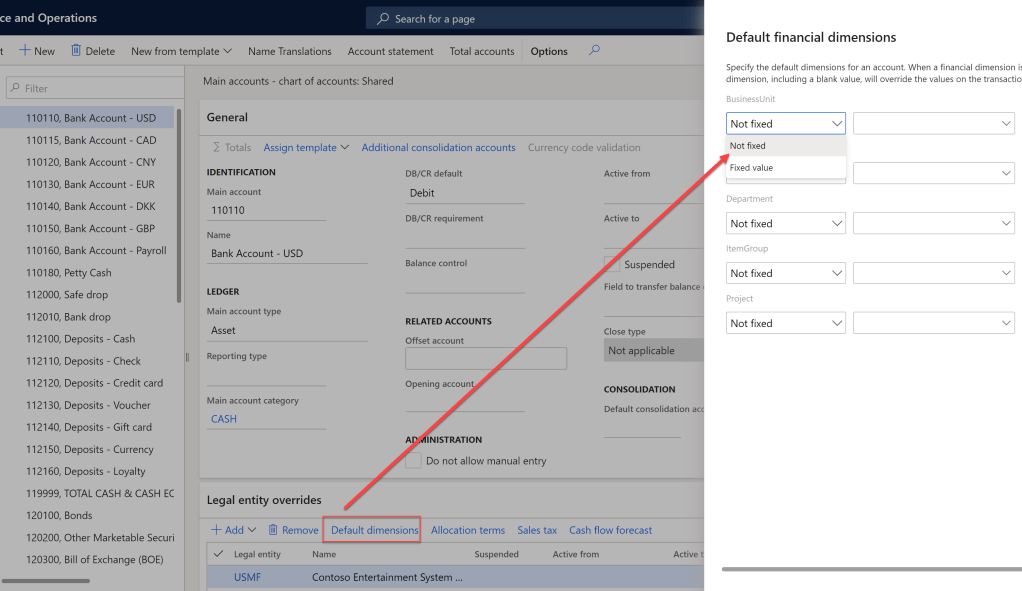
This fast tab allows the account to have default attributes on a company level. You can add default financial dimensions, set the account up for allocation, fix sales tax codes, or identify forecast allotments, from this tab. If you have more than one company, you can also determine which company has a unique attribute. Let’s take a how to set these features up on the Legal Entity Override tab.

Financial Dimensions

  • By selecting the Default Dimension link, you can identify what to default, and if changes can be made.
    • Fixed- Can’t be changed by the user when keying.
    • Not Fixed- Can be changed by the user if needed when keying.
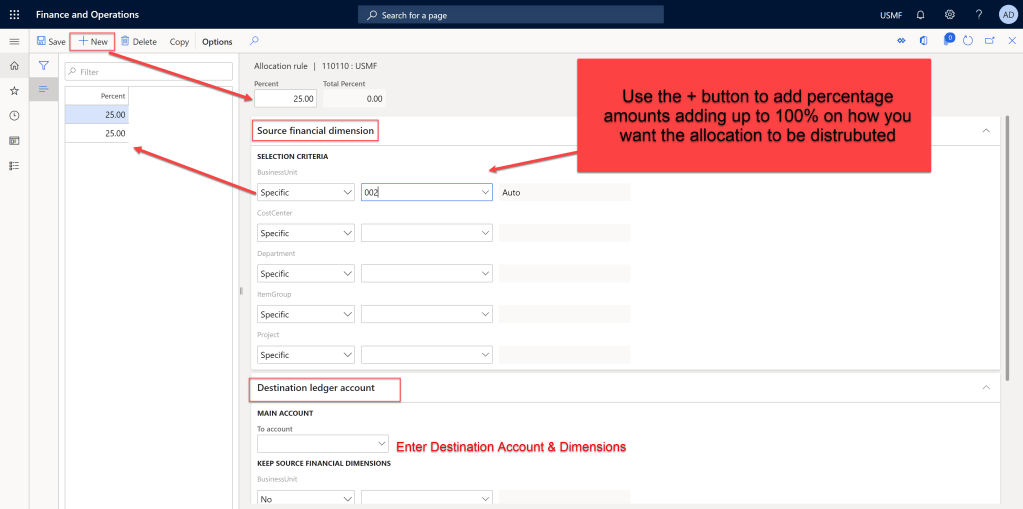
Allocation Terms

  • You can set up main accounts to automatically allocate to a specific rule by checking the allocation box and creating the allocation terms. 
    • You will select the source and can identify to pull precise financial dimensions, or lack of dimensions with the Specific, Not Specific drop-down box.
    • You will also determine the destination and the percentage.  You will create the different portions of the allocation until you have reached 100%
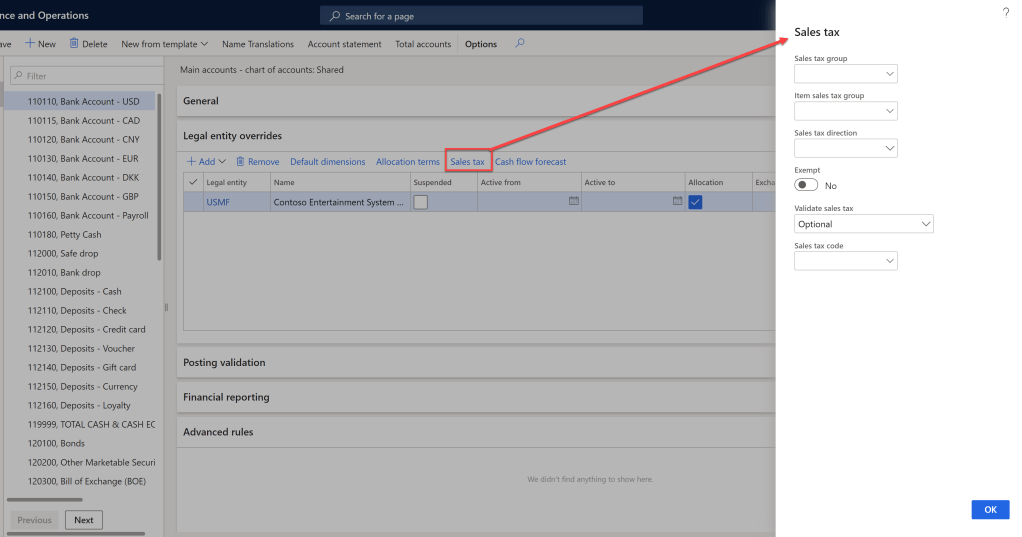
Sales Tax Codes

You can set up Sales tax codes, item groups, and tax directions associated with the main account. Additionally, you can set up what type of validation options, if any, are required for the sales tax codes for that account.  
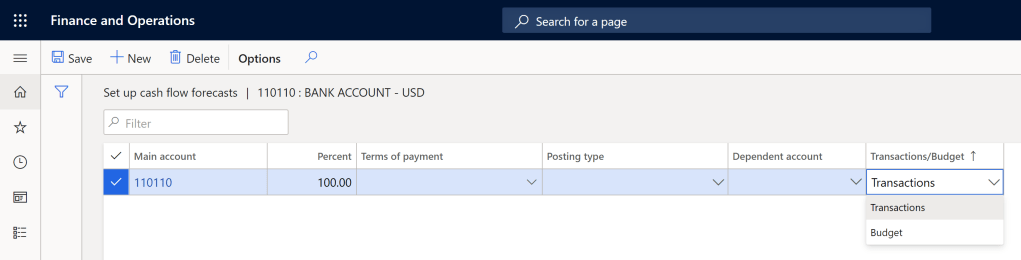
Cash Flow Forecast

  • On accounts that will be used for cash flow forecasts, you can identify the percentage to allocate. 
  • You can also select if any accounts will be affected by transactions in that specific account.  
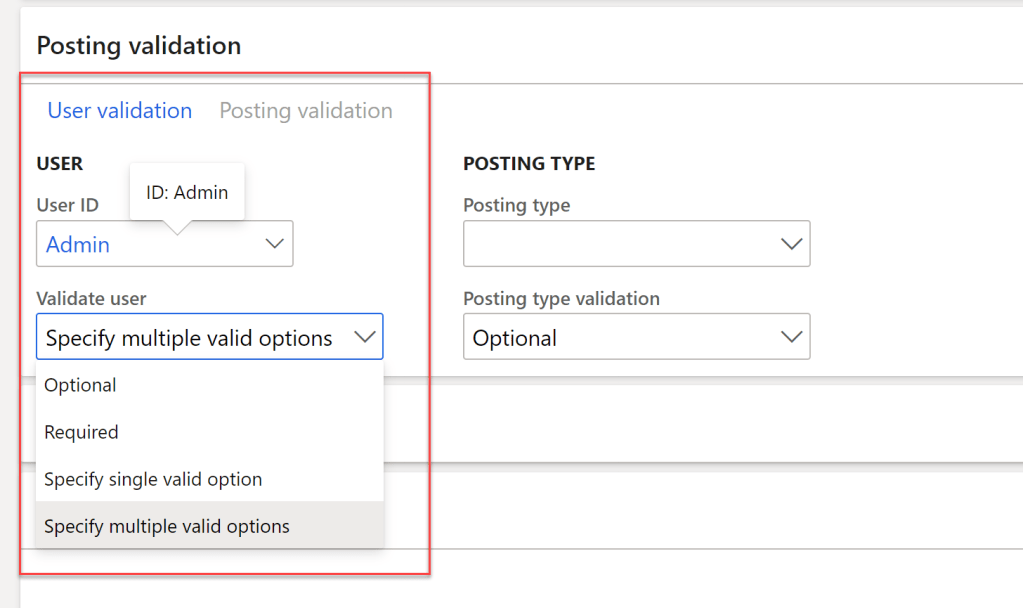
Posting Restrictions Fast Tab

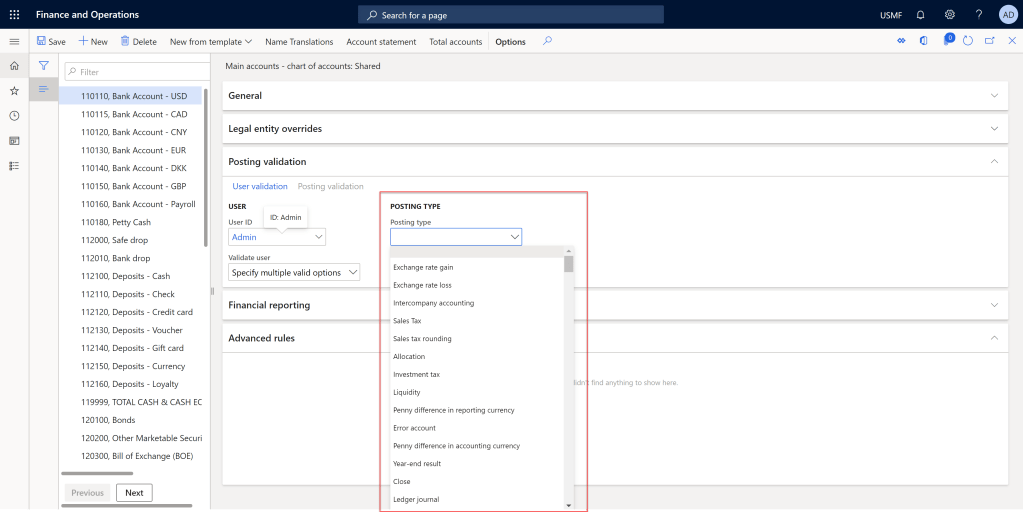
This tab allows you to restrict who or what type of transactions can be posted using the associated main account. 

  • User restriction: you can control who can post the account by specifying the user in the drop-down box.  You can also indicate what level of validation is required; optional, required, single user, or multiple users. 
  • Posting type: You can control the transaction type associated with the account. For example, for accounts related to sales tax codes, you must list that it is used for Sales tax under the Posting type.  Again, you can indicate the same validation scenario as user validation rules.  
Financial Reporting Fast Tab

This tab identifies what type of exchange rate should be used on the account when currency exchange, and translation is done in Management Reporter 

Exchange Rate- same as exchange rate types set up in system 

Translation rate

  • Current- Uses the same rate as the date of the report and is used for balance sheets 
  • Average- Used the average of the exchange rates over the period, and is used for P&L accounts 

  • Weighted Average-Uses a weighted average based on the days in effect, and is used for P&L accounts. 
  • Transaction Date- Uses the rate for the date when the transaction was posted. This is used for R.E., and long termdcaff6 equity accounts, such as Fixed Assets.  

Is it over yet??

To be fair, I warned you that setting up a main account was much more involved than expected! That is part of my love/hate relationship with #D365Finance; there is a lot of mighty bells and whistles hidden in a sea of fields. This blog doesn’t even cover all of the options, and fast tabs, just a majority of the ones I have typically seen used. Just walking through the tabs proved to be enough content for one post. In my next blog, we will take a look a the main account types and categories as promised.


Featured

Getting Started with the Chart of Accounts in D365 Finance

Newest Icon!

Where to begin?

One of the most important aspects of a financial system is the chart of the accounts. It is also one of the first places that you need to start when configuring D365 Finance. This article is a 10,000-foot view of out of box capabilities, relevant to a consultant or end-user. I’m excited to share a series of articles that will dive deeper into each functionality. I hope that my experiences will be beneficial to those new to consulting, needing to gain a deeper understanding, in a quick amount of time.

Intro to the Chart of Accounts in D365


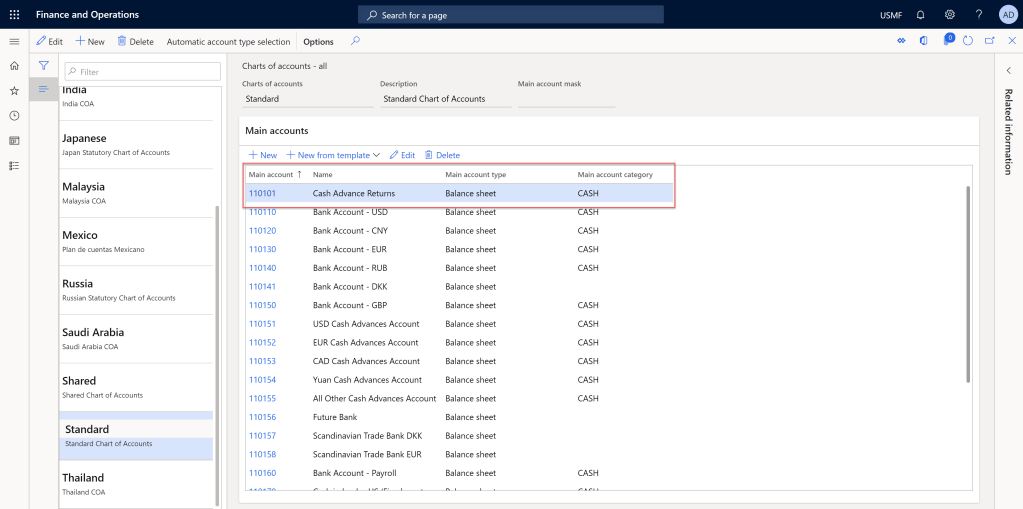
The chart of accounts (COA) is an index of accounts in the general ledger that identifies how those accounts link to financial reports. D365 Finance lists the number, name, type, and category of a main account.

[NAVIGATE: General Ledger> Chart of Accounts> Accounts> Chart of Accounts.]

The COA is all about grouping, similar revenues, expenses, etc., to meet the financial reporting needs for internal decisions and audits. It should also be reviewed by a CPA, as it will need to meet audit standards as well. An organization may have one chart of account for each legal entity or have a shared COA across all the entities. The main parts that impact the COA in the system are Main Accounts, Financial Dimensions, and Account Structure.

Main Accounts

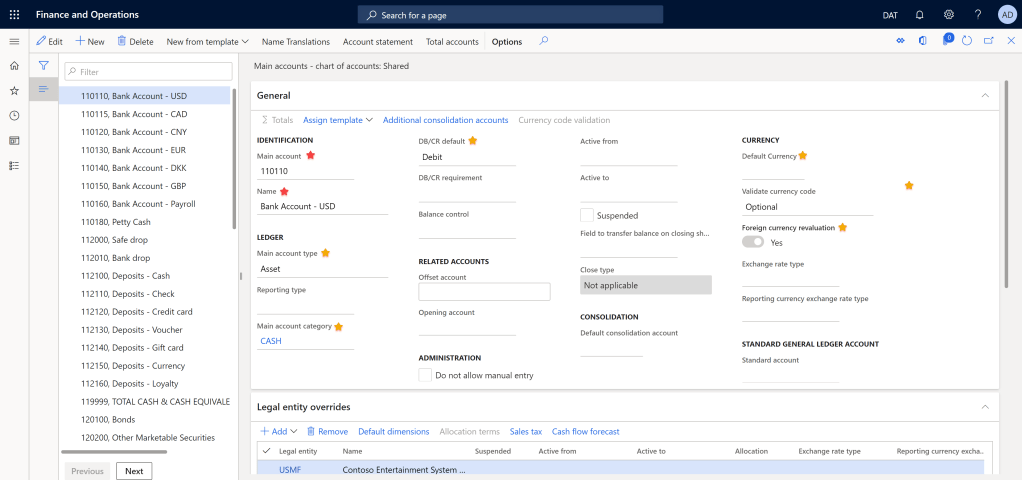
Main accounts are general ledger transactions, balances, or totals that are associations to accounts on the financial reports. The system requires a number, name, and type, but it’s also a good idea to at least fill out the main account category to link to default financial reports. There are many other options you can set up as defaults such as currency, debit/credit defaults, financial dimensions, exchange rate types if manual entry is allowed, and many other options. They will enable the system to meet specific company requirements.

[NAVIGATE: General Ledger> Chart of Accounts> Accounts> Main Accounts]

🔴 = required
🟡= nice to include

Financial Dimensions

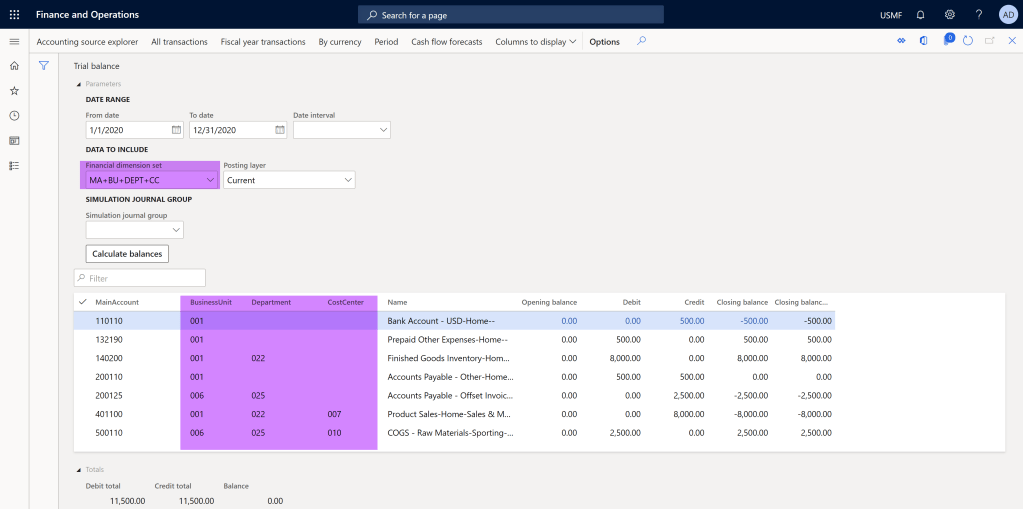
Financial dimensions are a compelling feature of D365 Finance. They allow you to further breakdown, track and analyze various parts of the COA. Most commonly, financial dimensions categorize different types of revenue and expenses. For example, there might be a need to record income by product, product type, or maybe customer group, etc. You can also use Financial Dimensions to track projects, regions, and many other useful groups. The benefit is that you can review reports automatically by various dimensions, instead of having to perform excel surgery. The options and flexibility of financial dimensions are limitless!

The highlighted section shows the Trial Balance with the amounts broken down by financial dimensions, instead of just by the main account.

Account Structures

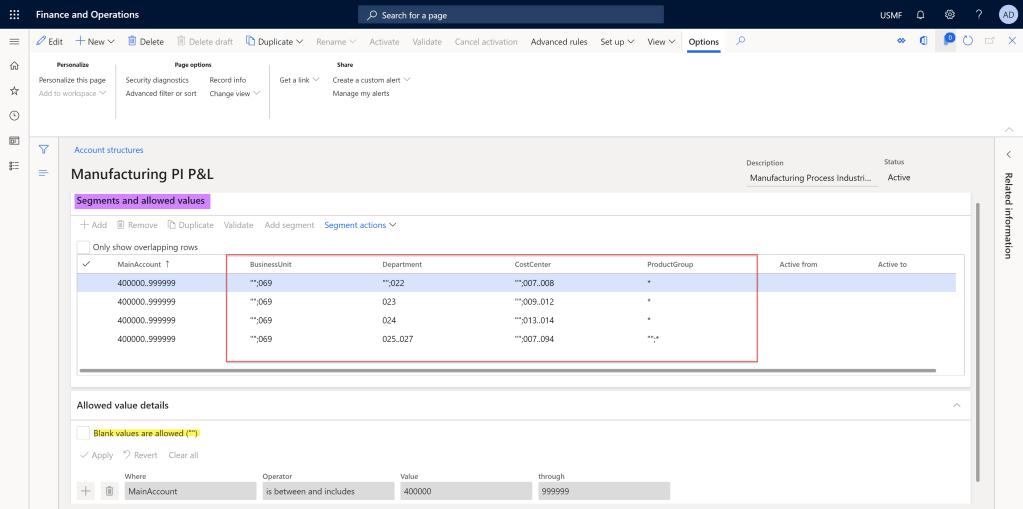
Configuring the account structures is the process of identifying which dimensions can be used on specific account ranges. For example, you may want to look at the product, and item group for revenue and cost accounts, and department for OPEX expenses. You can identify the order you wish to see the main account and financial dimensions. Additionally, you can provide more structure by having specific business rules and values that are allowed for each segment based on the previous dimension. This allows the end-user who is keying various entries to ensure accuracy and efficiency. More so than outdated systems that do not have this extra functionality.

[NAVIGATE: General Ledger> Chart of Accounts> Structures> Configure account structures]

This account structure shows allowed combinations of financial dimensions allowed for the P&L accounts 400000 to 999999. Some dimensions allow blanks, so the user won’t be required to enter this information.

How will this help?

The big winner of this sophisticated general ledger organization is the ability to produce supreme financial reports for both decision making and legal purposes. Main accounts are the basic building blocks of the general ledger in most ERP systems. They can be sliced and diced for various recording purposes by using financial dimensions. In order to prevent extra work correcting transactions booked to the wrong account due to a user’s judgment error, the account structure can be configured to allow only desired ranges based on the main account, or proceeding dimensions. A central feature of D365 Finance is how easily the chart of accounts can be configured to meet extensive business needs across a multitude of industries.

To learn more in-depth details, tips, and tricks on main accounts, financial dimensions, and account structures in D365 Finance stay to this series and use the advice in your day to day tasks, or when configuring a new system. 👩‍💻👨‍💻

Featured

Here to Help

Here goes nothing..

Do The Thing

— Dona Sakar

Wow, so here it is, my first blog post! I have been mulling over a “blog” for a couple of months. Who will read it? What will I say? Why do I think anyone will care about what I have to say? I really haven’t answered any of these questions yet to be honest…

What I do know, is that I want to help others. Specifically, as they make their journey into either consulting, or as a end user, for the Dynamics 365 Platform, including Business Central, FinOps, PowerPlatform, and Flow. I want to help others feel more empowered in their role, in a more efficient process.

Join me on my adventure, and I will share various community resources, training sessions, easy tutorials and How to’s, etc. If you have any specific questions, I’m happy to work on those as well. Also, I’m always open for feedback, advice, corrections, insight. I’m here to learn, as well as help others learn!

Main Accounts: Categories & Types

Introduction

The first two blogs in the series discussed how to set up the chart of accounts, and reviewed numerous fields on a main account in D365 Finance.  We briefly discussed main account categories, and types, with a promise to discuss in more detail later.  “Later” has arrived!  Finally, we can see how the pieces tie together, and the powerful financial reporting capabilities that D365 Finance. 

Main Account Categories

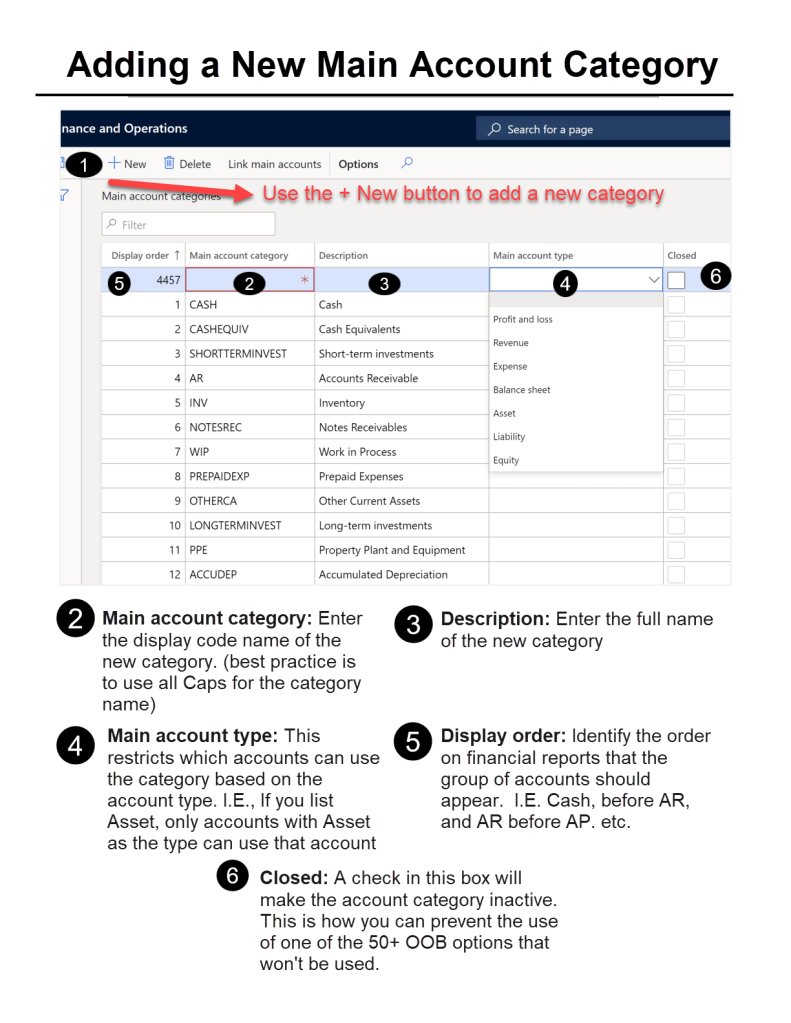
 A main account category provides a grouping of accounts by their role in financial statements.  For example, ledger accounts associated with bank accounts (usually a number starting with 1xxx) will be linked to the main account category “Cash”.  You may have multiple main accounts, one for each bank account, that are all cash accounts.  By linking them to a category, financial reports can pull all the “cash” accounts.  This allows for easier reporting maintenance and traceability.

There are over 50 out of the box main account categories.  If one of those do not work, there is always the option to create a new main account category.  While new accounts can be created, old accounts cannot be deleted, but you can close them so they won’t be used.  The visual below walks through adding a new category.

Main Account Types

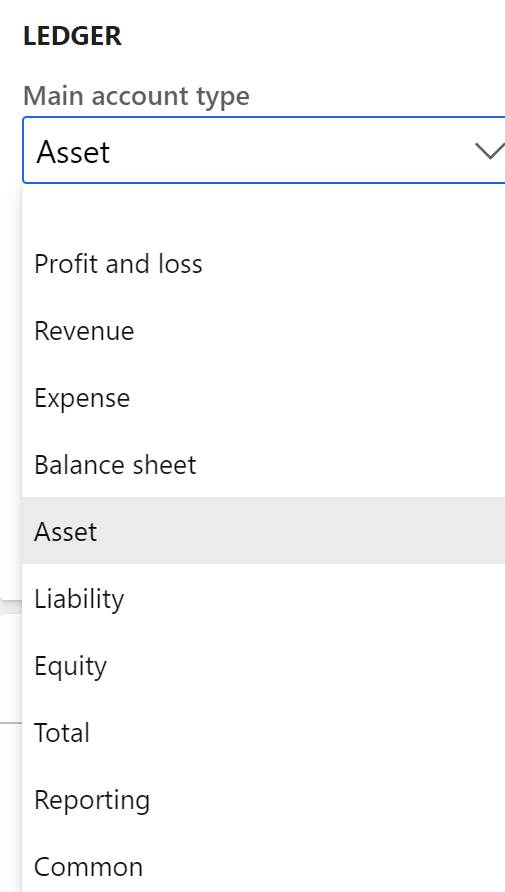
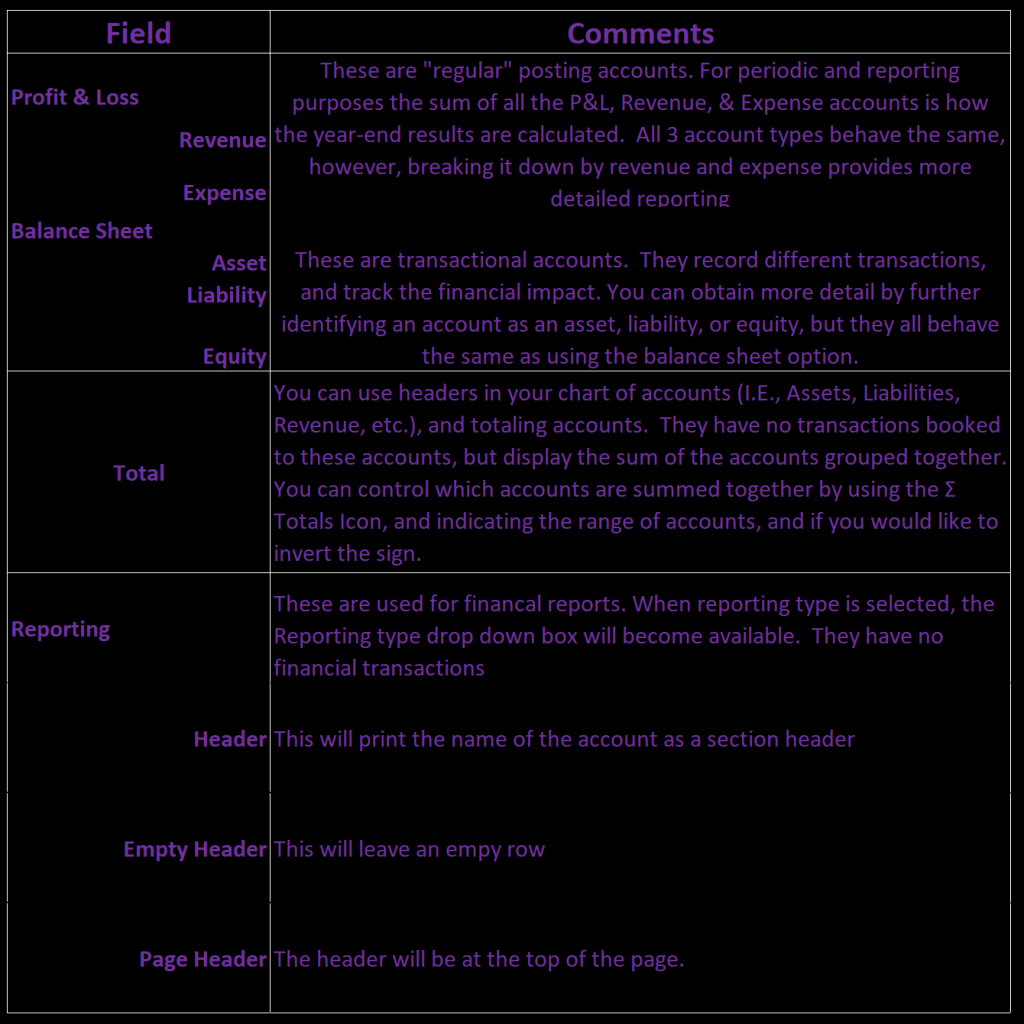
Main account types control how the main account will behave in the chart of accounts, or appear on financial reports, and other analysis tools, like Power BI.  There are 10 options.

Main Account Types

Main Account Type Descriptions

Financial Reports

D365 Finance has default financial reports.  The reports can be edited inside of management reporter (MR).  MR has Row definitions, the body of a report, which are linked to a combination of individual accounts, main account categories, and financial dimensions.  Categories will include all the associated accounts for the identified row.  For example, if you are creating a balance sheet, in the asset section, for bank accounts or cash accounts you can have the row linked to bank account 1 + bank account 2 + bank account 3, etc.  Every time you add a new bank account, you will need to edit the report.  By using a main account category, and assuming the “Cash” category is associated to the bank accounts, no report maintenance is needed when adding a new bank account.  The balance sheet will automatically incorporate the new account, because it is mapped to the category, not the main account.  There are default reports that you can use right out of the box, by using default main account categories.

💡💡💡

As I said earlier, there are only a few required fields, but obviously there are a lot of bells and whistles available on a main account. Main account categories and main account types are two features, that are unique to Dynamics 365 Finance.  They provide robust categorization capabilities, and customizable financial reports. Now that you are on your way to being a main account expert, the next post will add the financial dimensions piece to the chart of accounts structure.

My guest blog on Microsoft đŸ˜Ž

[Guest Blog] World Maximization: How Microsoft Power Platform Can (Literally) Change Lives

This article was written as part of the Humans of IT Guest Bloggers Series by community member Mary Thompson. 

“If you think you can make a difference, then you have to do it because if you don’t, no one else will.” -Dona Sarkar, Principal Advocate, Microsoft Power Platform


The Microsoft Power Platform is technically P2. Mathematically, an exponential increase is to rise at a steady, rapid rate. This is utterly applicable to the Microsoft Power Platform. As an individual you can grow exponentially by using this citizen developer toolset. The platform as a whole, and its presence in current business application, and future estimated presence is truly mind-blowing. The system as a whole is growing at an unprecedented rate. This is why I have a theory on how it can change the world…


Six months ago, my life changed after attending App In a Day (NYC), the Power Platform day long instructional boot camp. In one day, me, a technical idiot, was digitally up-skilled. I typically struggle with a VPN, but after the course, I could suddenly see a myriad of solutions to daily problems in the business world. By creating apps, automating business processes, and analyzing data using Power BI, I could provide viable solutions for clients with no code! Isn’t that amazing?


I’m the type of person who firmly believes if I can do something, then someone else can do the same thing. Also, If I can help them, I will. With that being said, I was dizzy from an overload of ideas processing in my head at a speed of 10 GHz. How could I share this transformation up-skill with others? My heart was committed. I needed to find a way to put all of this into words to share with others. That is when I decided to call my passion project “World Maximization“.

Specifically, I want to help as many people as possible reach their maximum potential using the Power Platform.


Ideally I want to help everyone, but it’s not realistic to say I can help everyone all at once. You must break big jobs into small manageable pieces. So, in my quest for World Maximization, I plan to start in areas that are near and dear to me heart. For that reason, I’d like to share my logic as to how the Power Platform can be a life-altering up-skill to students and single income families. Of course, it is beneficial to everyone, but this is just where I want to focus my initial efforts in helping to change lives through the Power Platform.

The amazing thing about the P2 and citizen development is that you can create a Power App with something as basic as an excel spreadsheet. I’d be willing to bet that the average elementary age child knows how to work their parents’ cell phone better than the adults. Today’s students have been inundated with computers, iPads, cell phones, apps, etc their entire lives. They think in terms of “what app can do that for me”. Give them the skill set to build something they have been using for 5-10 years, and I know the outcome will be truly innovative.


In addition to a natural ability to be amazing citizen developers from a young age, students’ college admissions acceptance ratse would also skyrocket with this new cutting-edge technology. Athletics are not for every child, similarly, for various reasons, some students may significantly struggle in typical academic settings. What if they had a powerful new skill in app development, without needing to know how to code? The new technology era is another place for students to find their niche and boast some impressive extracurricular activities at the same time.

Another way the Power Platform can help students reach their maximum potential is by giving them a viable income solution through their college journey. Instead of typical minimum wage college jobs, they would have an employable skill that would allow them to do part time-remote app development work, thereby gaining experience at a decent wage. The good news just keeps rolling in: that income can also help pay for college, and help avoid hefty student loans. It’s a gift that keeps on giving.

The gift-giving magnitude of the power platform is not just limited to students. I know that it can provide life changing experiences for single-income families as well. As a single mom, I put myself through school, and worked full time. I missed out on a lot of time with my son because I was in school all day and worked at night. I did what I had to do in order to finish school so I could get a job, and provide a steady income and life for my son. I know that if the Power Platform had been around at that time, my quality of life and work-family balance would have been significantly better. I could have worked from home and made a lot more money!


My story is not unique, there are countless of families in similar and worse situations. I know without a shadow of doubt that if single parents had the opportunity to digitally up-skill through learning the Power Platform, it would transform their lives. Once again, an exponentially positive effect would occur from P2: children’s lives would be significantly better as a result of their parents being home more. Power Platform for the win!


My passion and hopes for the future are that World Maximization will become a reality. It doesn’t just stop with these two groups either. It is only the beginning. I don’t know about you, but when I think about the possibilities with the Power Platform, I feel so invigorated to be a part of a community that can help make dreams come true. I’m so excited to see what the future will hold with the Power Platform.

How are YOU using Power Platform to change the world today? Share with us in the comments below!

#HumansofIT
#LessCodeMorePower

What IS Abbey’s App?

When I was younger my grandma would only use pencil to write down my address in her book.  She said I moved around too much to use pen. When you move that often, you tend to have amazing memories of your friends from those chapters, but you don’t really get the experience of growing with them. 

Mandy is my oldest friend, going on 11 years. I love and cherish our friendship, and I’m so thankful that we have grown up, and remained friends. Mandy has an 8 year old daughter names Abbey.  Abbey is autistic and completely non-verbal. I have seen tears of frustration in Abbey’s eyes, when she can’t communicate when she needs.  It breaks my heart to not be able to  help her, and I can’t imagine what my friend must go through daily.  My desire to help and the amazing aura of the D365 Community is what got my wheels spinning on Abbey’s App.

First, I saw Phil Toppness do a demo at a D365 Saturday back in June 2019, using the Face API as a mood detector funny app. Then, in September I participated in the TDGI Global Hackathon.  Some of the prompts revolved around gamifying learning, and using AI to help children with special needs. This reminded me of my special friend Abbey, and how I have seen her struggles when she gets overwhelmed in social settings, but doesn’t know how to process or communicate to mom how she is feeling. I also know that part of what helps Abbey calm down in these situations is some valued screen time, and her LOVE for selfies. There was only 5 hours in the hackathon, and I knew this app was too much to tackle in that time frame.  However, my mind kept on ticking, and I had to #ToDoTheThing.

The idea was born! Create an app that has “Learn, Practice, and Play” stages.  The learn stage shows a couple of videos/photos of social situations, and the appropriate response for those emotions.  I did some research and found 6 basic emotions to focus on. Some of them are easy like happy and sad, some are more difficult, like surprise or scared. By emphasizing on different situations, and the facial expressions, the child has a frame of reference for how they should respond. 

The next phase is hands on practice!! The child will be asked to take a “selfie” of themselves showing the emotion given, (i.e. “Happy”) Using Face API, feedback will be given on the level of “happiness” the child showed in their picture. This goal, or objective will be for the child to reach a desired level of happiness before they can move on to the next phase.

The Play phase combines the first two scenarios.  The child is shown a video clip, but instead of being told what emotion is appropriate, the child will take a selfie to show the correct facial expression to show the emotions appropriate for the situation.

I quickly realized this app contains some concepts and components that would take me a REALLY long time to figure out. I was asking the community (D365, PowerPlatform, etc) a lot of questions, and had a lot of positive feedback and excitement over the project.  I knew that if I could turn this project over to the community per say, and just try to provide an outline, and clear objective, that the end results would be far greater than anything I could dream of on my own.  

So a few tweets, later, and lots of mistakes, a plan was set in place to meet on December 7, 2019 from 10:00am-3:00pm. Boy oh Boy… did I get in over my head, but that’s been half the fun! I plan to blog my series of mistakes and failures of what is now my little #CommunityHack4Good event.

There are MANY challenges and limits, but I’m okay with all of that.  My goal is for the community to be able to collectively put together a workable prototype that can essentially go through a CRP 1 type phase.  I hope that it sparks all kinds of thoughts in the imaginations of those far smarter and savvy than myself, with a result of having a true impact in helping children with autism learn how to better understand how to express their feelings.

I’m not an expert in any of this, I’m just a person with an idea, excited to be a part of an amazing community, that is working together for the betterment of others. Thanks for taking the time to read about the start of this wild ride, I hope you will follow our journey.

Create your own website, free on WordPress.com.Create your own website.
Start free